Sales Assistant
The Sales Assistant feature includes a configuration option that allows assistance activities to be tracked for accounting and reporting purposes. By enabling this setting, assistance data can be recorded and later reviewed through dedicated reports.
Main Screen> Number Pad> Sales Screen> SALES ASSISTANT ICON
From the Main Screen, click on the numberpad and input the assigned personal password to log in.

When the person icon is selected, a window appears, allowing the employee who will receive credit for assisting with the sale to be chosen.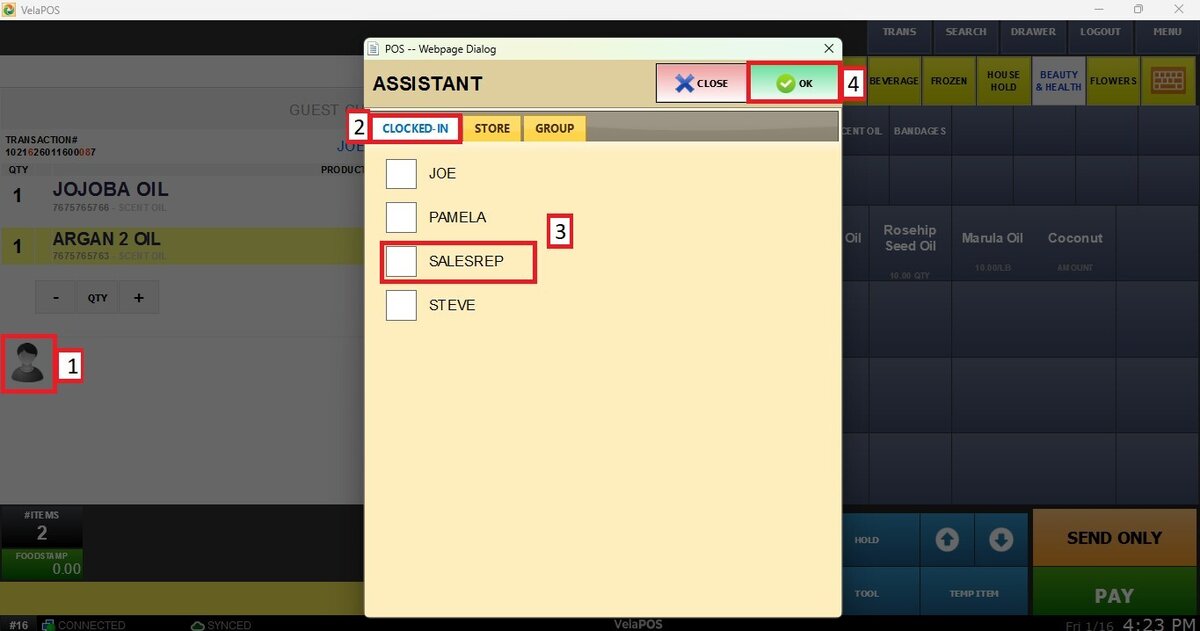
Note: If this setting is configured as REQUIRED, the window shown above will appear automatically, and selecting the employee who will be granted the sales assistance will be mandatory.
To learn how to set up this feature, refer to Sales Assistance.
To learn how to access the reports of this feature, refer to the Assistance.