Common Problems and Issues during Program Installation
This guide outlines the most common issues that may occur during the installation of the POS system and provides clear steps to resolve them. Following these recommendations helps ensure a successful and stable installation.
1. NET.Framework Issue
The POS system requires a specific version of the .NET Framework. If an incompatible or corrupted version is installed, the program may fail to install or run properly.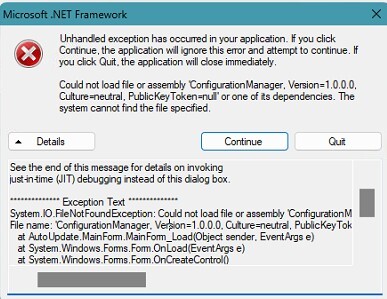
Solution
Follow these steps carefully:
1. Uninstall the current .NET Framework from the system.
2. Install .NET Framework 3.5 and the latest one.
3. Uninstall VelaPOS manually by deleting the VelaPOS folder from the following path:
This PC>Local Disk (C:)> Program Files (x86)
4. Reinstall the POS system.
After completing these steps, the installation should proceed without errors.
2. Installation Path Redirected to OneDrive
On some computers, OneDrive automatically redirects default folders such as Documents or Desktop. If the POS program is installed in a OneDrive-synced location, files may be locked or not fully available during installation or execution.
Solution
During installation, click BROWSE when selecting the installation path.
Choose a local folder on the C: drive, such as:
Local Disk (C:)> Program Files (x86)>VelaPOS

Best Practices Before Installing:
1. Pause OneDrive synchronization before starting the installation.
2. Run the installer as Administrator.
3. Ensure the installation path is always set to a local C: drive folder.