Basic
This section allows you to configure how the system interacts with customer data during a sale. It controls features such as age verification requirements, the methods used to collect customer information (name, phone number, email), and data validation to help prevent duplicate records.
Main Screen> MENU> SETTINGS> CUSTOMER>BASIC
Go to MENU and press SETTINGS.
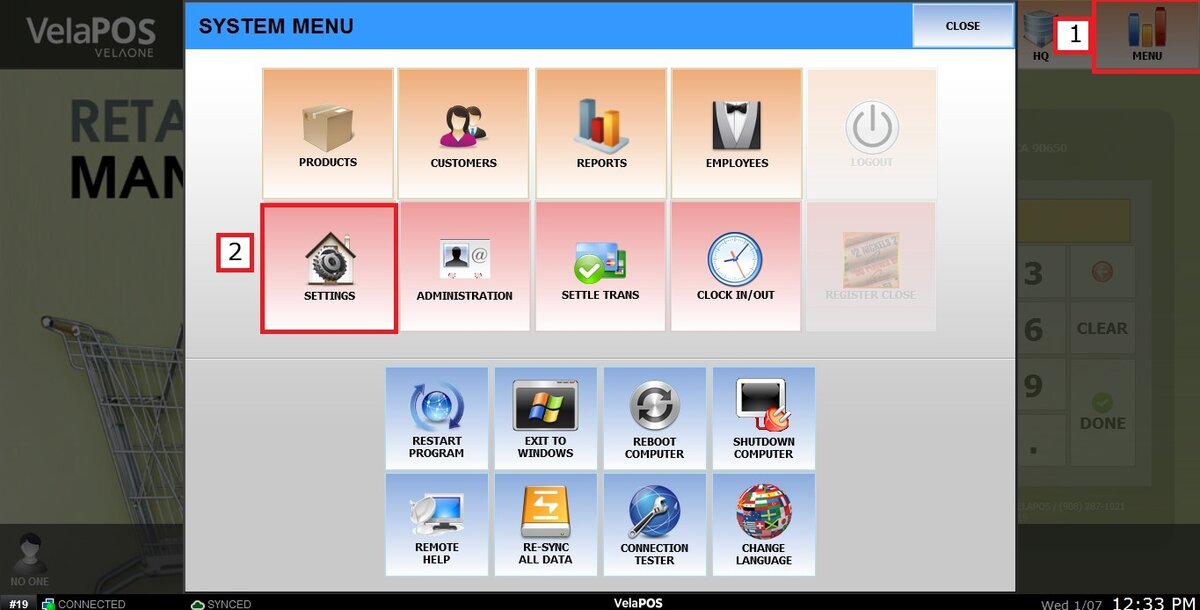
Go to the CUSTOMER tab, and click on BASIC.

1. AGE CHECK METHOD:
In the dropdown menu, select how strict the age verification will be during a sale. Available options include Quick Message, Confirm Only, Birthday Required, or the Blank option (no age verification will be performed).
2. ASK INFORMATION:
In the dropdown menu, enable or disable whether customer information will be requested at the beginning of the sale.

3. ASK METHOD:
In the dropdown menu, select how much customer information will be required when prompted, ranging from FULL to SIMPLE NAME.
4. ASK DEVICE:
In the dropdown menu, select which device will be used to request customer information. You can choose the Signature Pad, or leave it blank to request the information directly on the POS.

USE KEYTAG/MEMBERSHIP CARD:
Check or uncheck this box to enable or disable the system’s ability to recognize keytag or membership cards and display the customer information on the sales screen.
REQUIRED INFORMATION:
Check the boxes for the customer information that will be required while adding a new customer.
USE CUSTOMER SEARCH CODE:
Check this box to enable or disable the Code column in the Customer Search window.
PREVENT DUPLICATE PHONE NUMBER:
Check this box to prevent creating multiple customer records with the same phone number.

After changing any settings, make sure to click SAVE and then RESTART PROGRAM to apply the changes.
