1.
Welcome to
2.
Technical Support Guideline
Techical Support Time Line
Checklist Before Contacting Us
Spanish Knowledge Base
Non-Supportable List
3.
Hardware & Software Setup
Hardware Setup Guide
Video Link Guide
POS Hardware Setup Guide
Receipt Printer Setup Guide
Cash Drawer Setup Guide
Router Setup Guide
Software Setup Guide
POS Software Requirement
Windows Security Setting
POS Program Installation
Common Problems and Issues during Program Installation
Network Setup Guide
4.
Getting Started
Recognizing our software parts
App Icon
Main Screen
Sales Screen
Product Management (Inventory License)
5.
Operation
Clock In/Out
Register Open/Close
How to Perform a Register Open
How to Perform a Register Close
Item Management
Item Ring Up
Item Price Change
Item Menu
Memo
Tax Free Item
Serial Number
Product Info
Dual Price (Credit Card Adjustment Fee)
Sales Management
Transaction List
Hold
Temporary Item
Tool
Product Tools
Add
Product Search Tool
Serial Number Tool (S/N)
Break Case
Sales Tools
Return Tool
Print Tool
Tax Free
Shipping tool
Bulk Sale Tools
Transaction Tools
Transaction History Tool
Open List
Hold Permanently
EBT Tools
Giftcard Tools
Storecard Tools
Point Tools
Customer Tools
Payout Tools
Other Tools
Void
Payments
Paying with Cash
Paying with Credit/Debit Card
Paying with Gift Card
Paying With Store Card
Paying with Points
Paying with EBT
Split payment
Discounts/ Coupons
Open Selections
Predefined Discount
Rule Discount
Coupons
Standard Coupon
Product Coupon
Loyalty Coupon
Return/Exchange
Return (Ticket Barcode and Transaction List)
Standard Exchange
Exchange (store credit)
Operation Mode
Return Mode
Layaway Mode
Credit Card Settlement (Batch Close)
6.
Product Management
Standard Structure
Creating Inventory Department
Creating Inventory Category
Basic
Discount
Reward
Category Detail Tab
Category Detail
Id Check, Age Check
Print
Menu
Category Limits
Size
Creating Inventory Item
Add Wizard
Add Standard
Product Details
Basic
Sku's
Price Information
Taxable (Item Tax Setup)
Foodstamp
Product Labels
Price-types
Single
Multiple
Amount
By Weight
Multi-Weight
By QTY
Bundle
Coupon
Group
Level
Fields
Product Discount Tab
Menu Product Tab
Show Menu
Assigning Modifiers to a Product
Product Additional Print
Multiple Barcode
Inventory
Minimun and Maximun Parlevel
Add, Remove and Set Inventory
Queue to Transfer
Inventory History
Item Weight
Local Location
Location-Specific Inventory Table
Apparel Inventory
Breaks
Limits
Vendor
Report Tab
Admin
Print Label
Filters
Gear Icon
Select Columns
Print Search
Export to Excel
Download Updates
Latest Products
Custom Menu
Modifier
Inventory tab
Additions
New Addition
New PO (Purchase Order)
New Apparel
Addition Tools
Search PO
Inventory Reports
Additions Gear Icon
Inventory Transfer
Initiate Transfer
Accept transfer
Search Transfer
Transfer Gear Icon
Physical Inventory
Closed Category
Closed Store
Live
Inventory History
Purchase Tab
Vendor List
7.
Bulk Operations
Import
Import Categories
Import Customers
Import Storecard
Import Products
How to Import Products
How to Fill the CSV File (Products)
Export
Export Categories
Export Products
Export Customers
Export Storecard
Bulk update
Bulk sale
8.
Reports
Sales
Sales Summary
Shifts
Hourly
Products
Vendor
Customer
Discounts
Voids
Assistance
Settle
Product
Product Sales Summary
Low Stock Report
Apparel Report
Transaction
Transaction Report
Payments Report
Open Transactions Report
Employee
Employee Summary Report
Hours Total Report
Activities Report
Customer
Customer Sales Summary
New Customers Report
Birthday
Points Report
Store Cards Report
Survey
Payable
List
Daily Total
Category Hourly
Online Report
How to Access to Online Reports
Sales (Online Report)
9.
Loyalty System
Setup Loyalty System
Points
Create a Loyalty Coupon
10.
Administration
Info
Store and Processor Info
Logs
User List
Creating an Admin Account
Modify Employee Groups and Permissions
Terminating an Employee
Time Clock
Security
Sales
Product
Alert
Idle
Host Server
Hardware
Online
Email Notification
Tools
Export Data
Import Data
11.
Head Quarters (HQ)
12.
Employee
Modify Employee Group and Permissions
Adding a New Employee
Assigning an Employee to a Different Group
Remove an Employee from Group
Terminating an Employee
Restoring an Employee
User Information
Sales Assistant
13.
Customer
Creating a Customer Account
Customer Appointments
Sales Screen Customer
Surveys
14.
Settings
Main
Sales
Search
Hold
Discount
Return
Inventory
Transaction List
Foodstamp
Quick Access
Sales Assistance
Register
Customer
QSR
Report
Keyboard
Shipping
Optimization
Web Browser
Screen
Sales Menu
Layout
Custom Menu
Quicksale
Locale
Customer Display
Layout
Image / video
Print
Header
Body
Footer
Receipt Barcode / QR
Custom Message
Desktop
Payment
Tender
Cash
Check
Debit
EBT
EBT Cash
Gift Card
Store Card
Points
Custom Tenders (Other 1-5)
No Pay
Discount
Pre Define
Rule
Coupon
Standard Coupon
Product
Tax
Fees
Adjust
Level
Currency
SnF/Store and Forward
MISC
Product
Search
Random Weight
Inventory
Purchase Order
Custom Fields
Apparel Sizes
Customer
Group
Loyalty
Appointments
Custom Fields
Layaway
15.
VelaPay
VelaPay Installation
VelaPay Portal Request
VelaPay PAX app (Dealer & Agent Only)
VelaPay Dealer Portal Set Up (Dealer & Agent Only)
VelaPay Agent Portal Installation
VelaPay Home & Side Menu
VelaPay Sub-Agent
VelaPay Stores
VelaPay Terminals
© 2026 . VELAONE. All rights reserved.
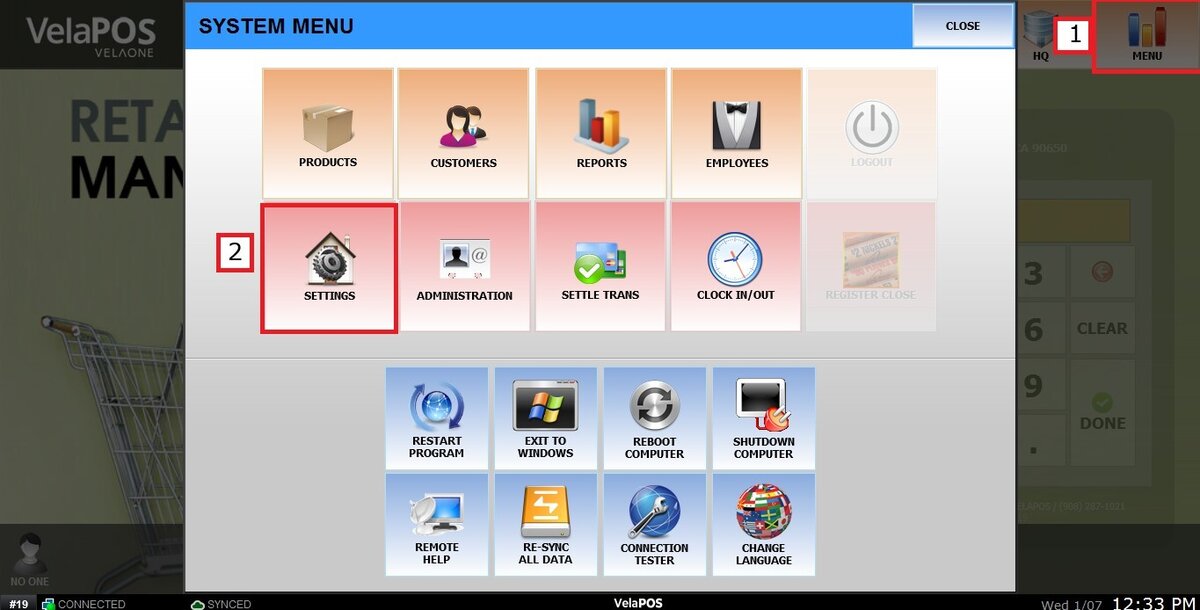
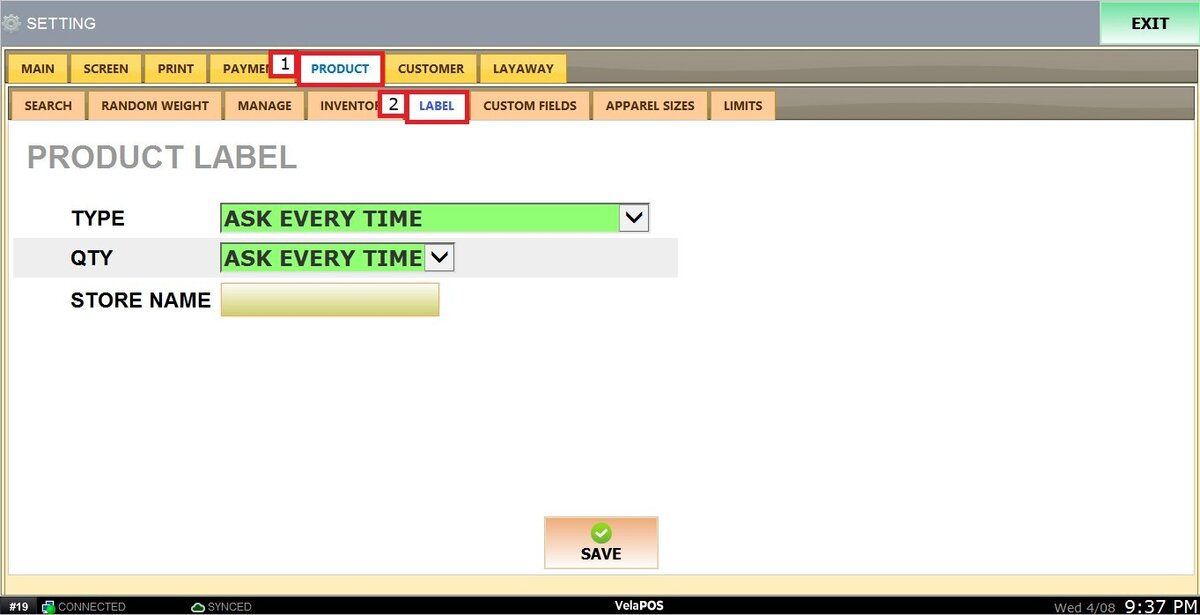
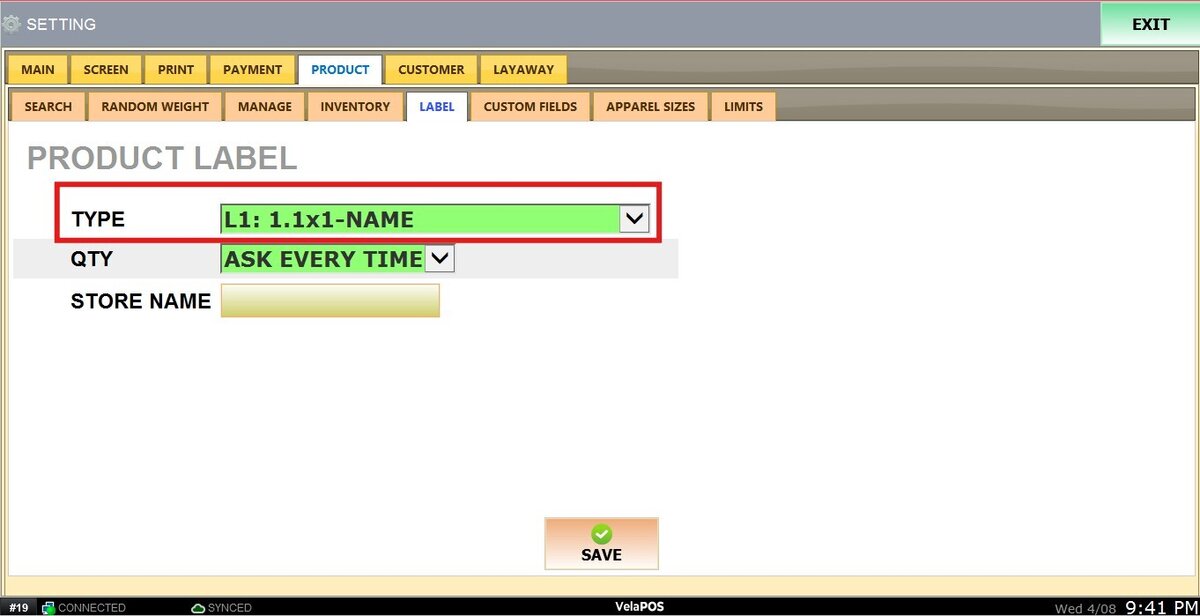
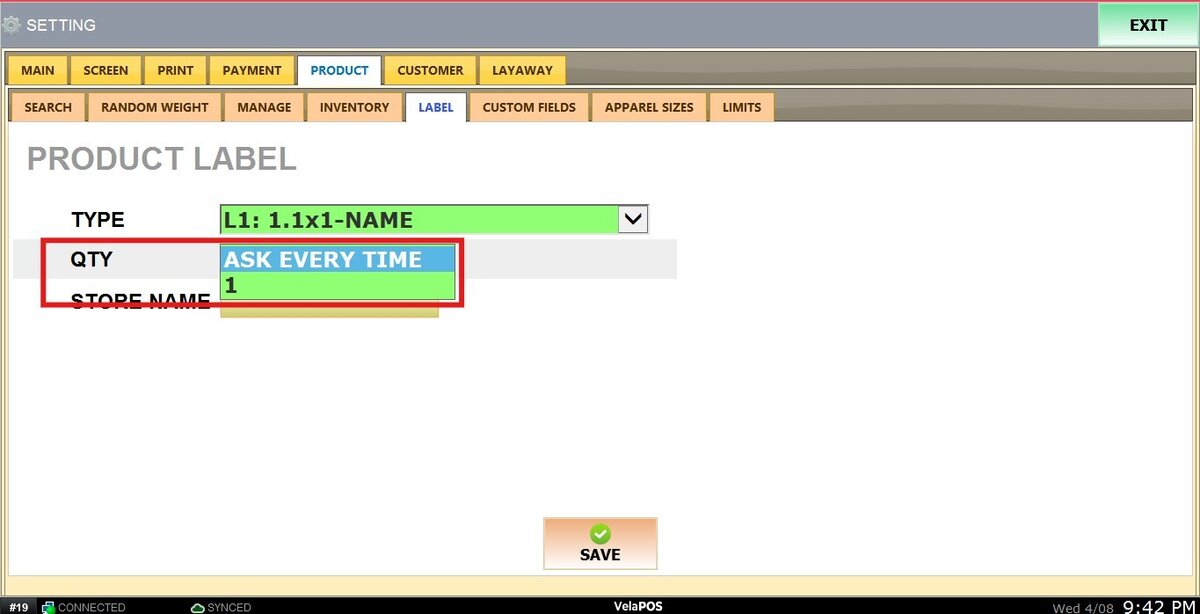
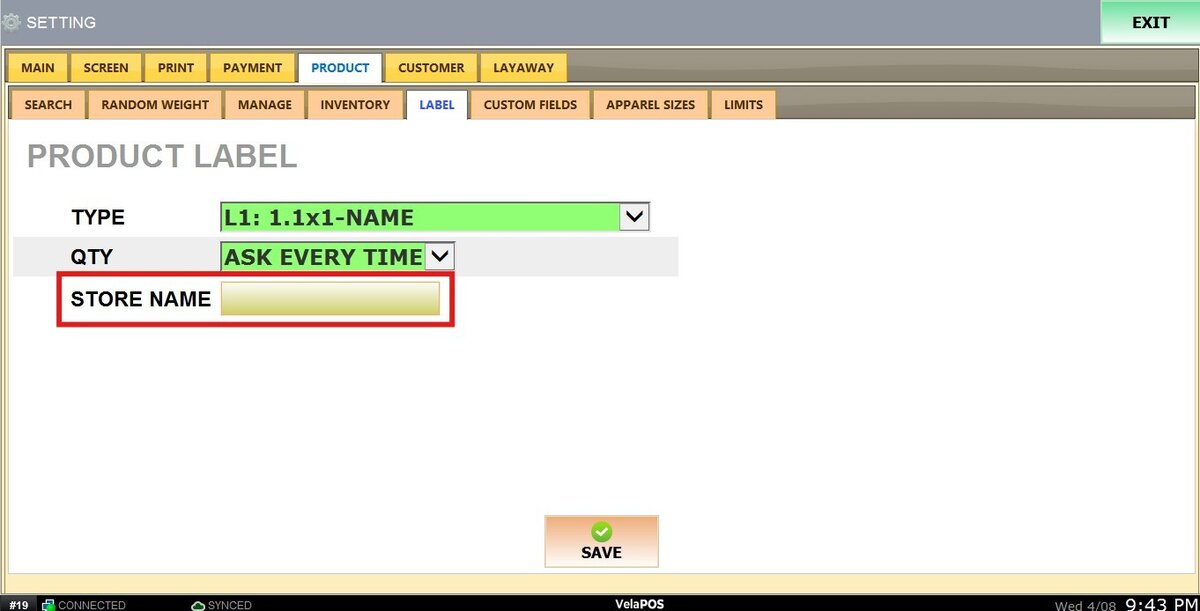
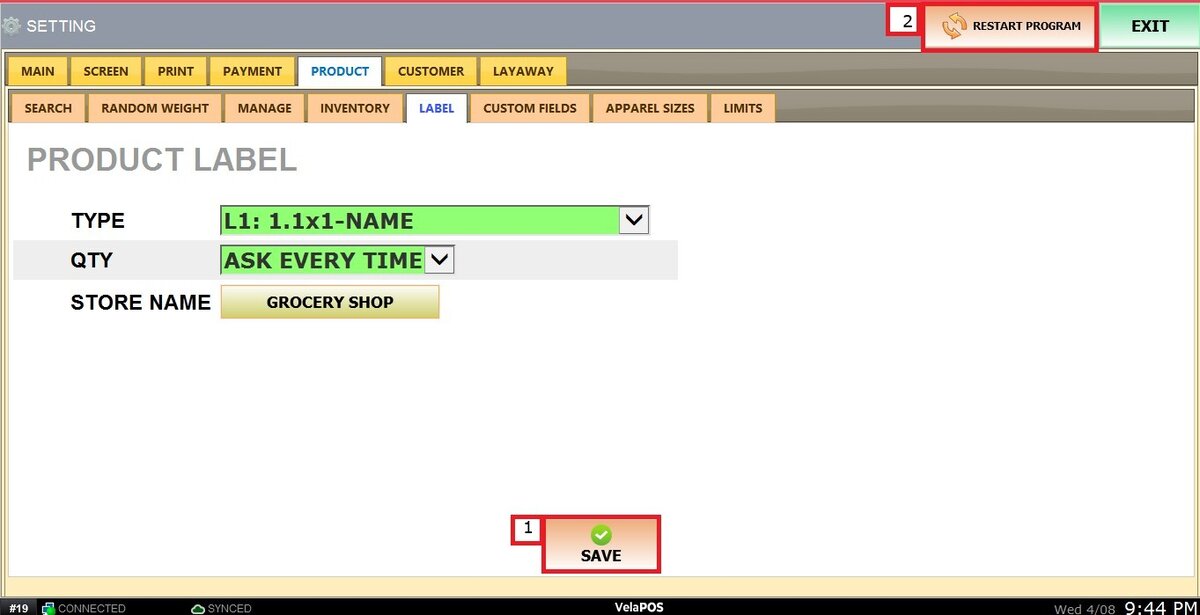
Label