Import Data
This feature enables you to upload Excel files into your POS system, allowing you to quickly add or update large amounts of information. This includes categories, products, customers, and store card records. By using the system’s import templates, you ensure that your data follows the correct format and can be imported without errors.
MENU>ADMINISTRATION>TOOLS>IMPORT DATA
Go to MENU and press ADMINISTRATION.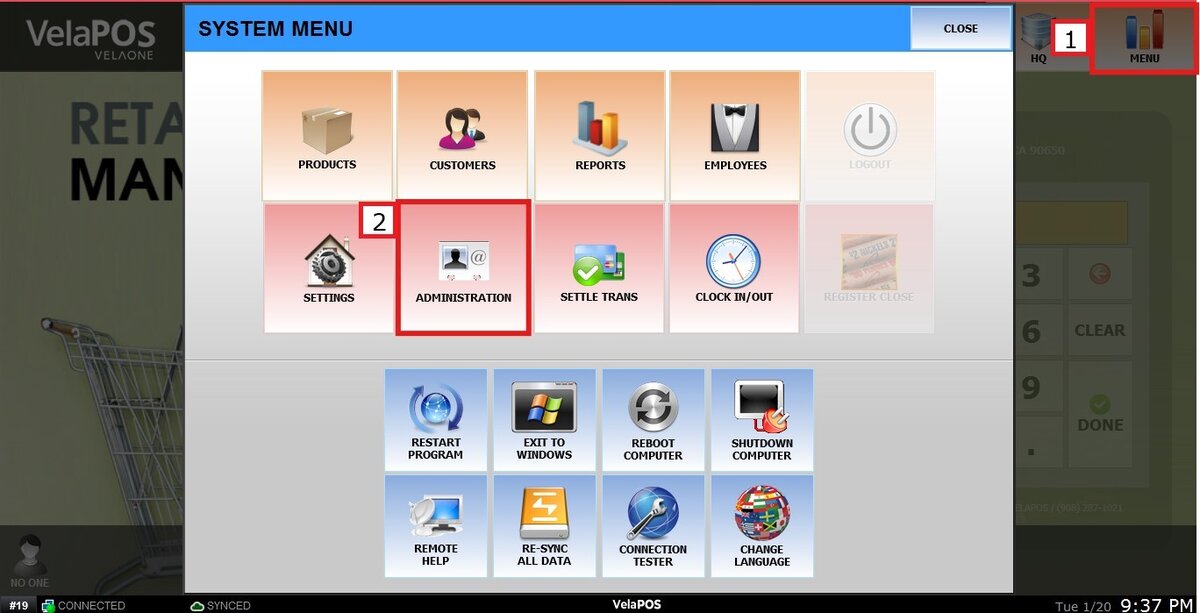
In the ADMINISTRATION section, go to TOOLS and select IMPORT DATA.

This feature is ideal for initial store setup, mass updates, and ongoing data maintenance. It significantly reduces manual entry, saves time, and helps keep your database accurate and consistent.
To learn how to import your database, refer to these links:
1. Import Categories
2. Import Products
3. Import Customers
4. Import Store Card