Export Data
This feature allows you to download important database information from your POS into organized Excel files. From here, you can export categories, products, customers, and store card details. This option is especially useful for data backups, bulk edits, and migrating information when needed for reporting or integrations. Once the file is exported, you can open it in Excel, review or modify the data, and keep it stored safely for future use.
MENU>ADMINISTRATION>TOOLS>EXPORT DATA
Go to MENU and press ADMINISTRATION.
In the ADMINISTRATION section, go to TOOLS and select EXPORT DATA.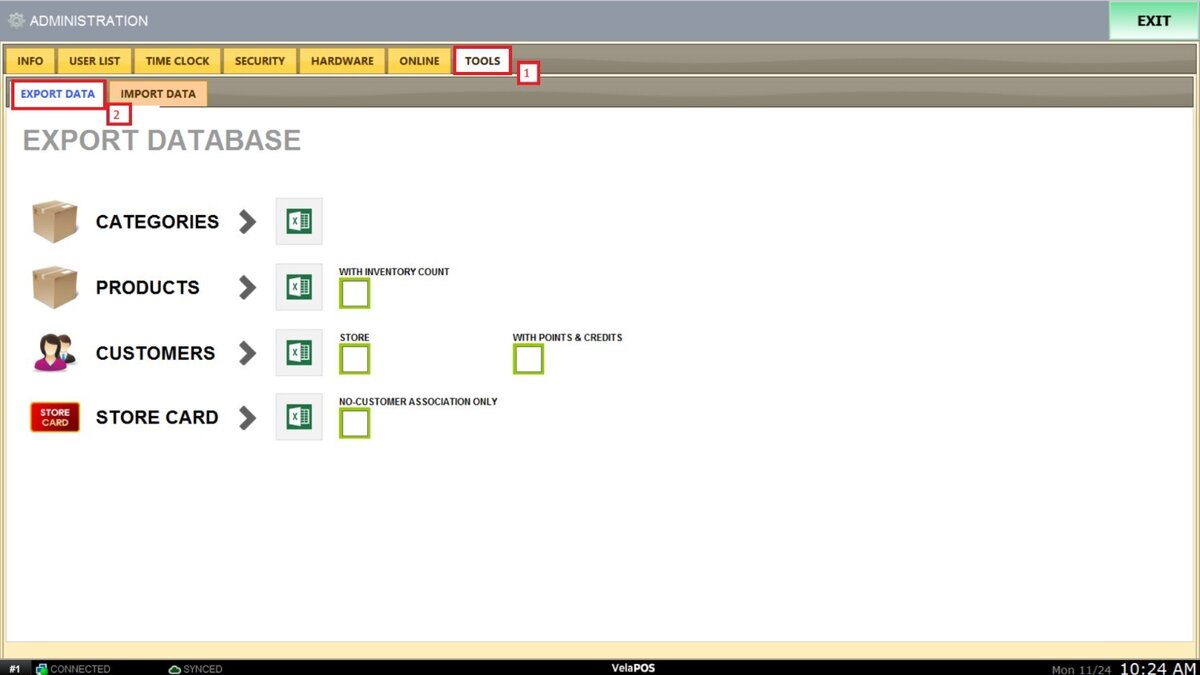
Each export option includes checkboxes that allows you to choose additional data such as INVENTORY COUNTS, STORE, or CUSTOMER ASSOCIATION, POINTS AND CREDITS, ensuring that the exported file contains exactly what you need.
To learn how to export your database, refer to these links:
1. Export categories
2. Export Products
3. Export Customers
4. Export Store Card